

Your roadmap to a fast & easy policy
Here are some things you can check off your mid-term to-do list to be prepared for audit, future payments, claims reporting, and tips for how to potentially save on premium.
1. Prevent surprise costs at audit
Update your agent about business changes
If anything about your business has changed, including new locations, updated payroll, or different types of work, let your agent know right away. These updates, known as endorsements, help ensure your policy stays accurate and prevent unexpected audit charges later.
Your agent must submit all endorsement requests. Contact your agent if you need to update your business information.
Collect Certificates of Insurance (COIs) for Subcontractors
Hiring subcontractors? Make sure you collect a workers comp COI from each one - liability insurance does not count.
If you don't have a valid COI, or if you pay a subcontractor outside their coverage dates, those payments may be treated as payroll and could increase your final audited premium.
Tip: Gather COIs as you go to avoid last-minute scrambling.
2. Documents to prepare for audit
Having these items ready makes your audit faster and easier:
- Quarterly 941 Forms
- Profit & Loss Statement
- Payroll records by employee, including job duties
- Certificates of Insurance for any subcontractors used during the policy term
- Approved waivers, if applicable (must be approved by BerkleyNet before exclusions apply)
3. Report claims early
Reporting a claim as soon as it happens leads to better outcomes for your injured worker and your policy.
- Employees get immediate care from emergency physicians specializing in workplace injuries
- Early reporting can reduce overall claim costs
- Lower claim costs may positively impact your premium at renewal
Report a claim online or call 877-497-2637 to speak with a doctor, available 24/7.
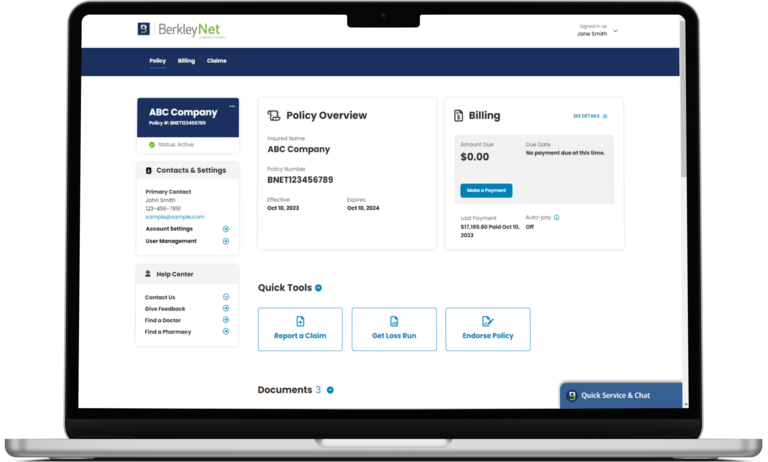
4. Manage your policy easily with BerkleyNet's online portal
Your BerkleyNet portal gives you a complete, self-service hub to manage your workers comp policy quickly and confidently. Whether you need to review claims, download documents, make a payment, or update your information, everything is organized in one secure place.
What You Can Do in the Portal
View and Track Claims
- See a complete list of all claims reported under your policy
- Open each claim to view detailed information, including claim representative contact details
- Monitor claim progress and history to stay informed throughout the process
Access All Policy Documents
- Download policy documents, endorsements, and state posting notices
- View invoices and billing documents directly from your policy overview page
- Access loss runs anytime without needing to contact support
Manage Billing & Payments
- Make secure online payments
- Set up auto-pay with flexible draft limits
- Review financial history with easy-to-read charts
Log in to portal to manage your policy, view claims, make payments, and access all your documents in one place. If you need help finding your policy number, use the Quick Service & Chat tool.